Client data stays in.AI still gets the work done.

Upload common office documents, such as Word or PDF files. Names, ID numbers, addresses and amounts are flagged for your team to confirm one by one. Your AI assistant only reads the approved version.

  1. Upload
  2. Flag
  3. Confirm
  4. Export

You want AI on your files. Your clients' data can't go with them.

  • 01

    Staff paste whole documents into AI tools — client names, ID numbers and deal values included.

  • 02

    To summarise or redraft, AI rarely needs any of that.

  • 03

    Redacting by hand and double-checking eats hours across a handful of files.

Four steps, all visible to you

  1. 1

    Upload

    common office documents, with the rule set that fits (e.g. "shareholder documents").

  2. 2

    Flag

    likely-sensitive details are highlighted and labelled by type.

  3. 3

    Review

    remove false hits, add missed ones, set replacement text, then publish.

  4. 4

    Use it

    download the redacted Word file, or let your AI assistant read the published version.

What it looks like

Actual product screen. Sample documents are fictional.
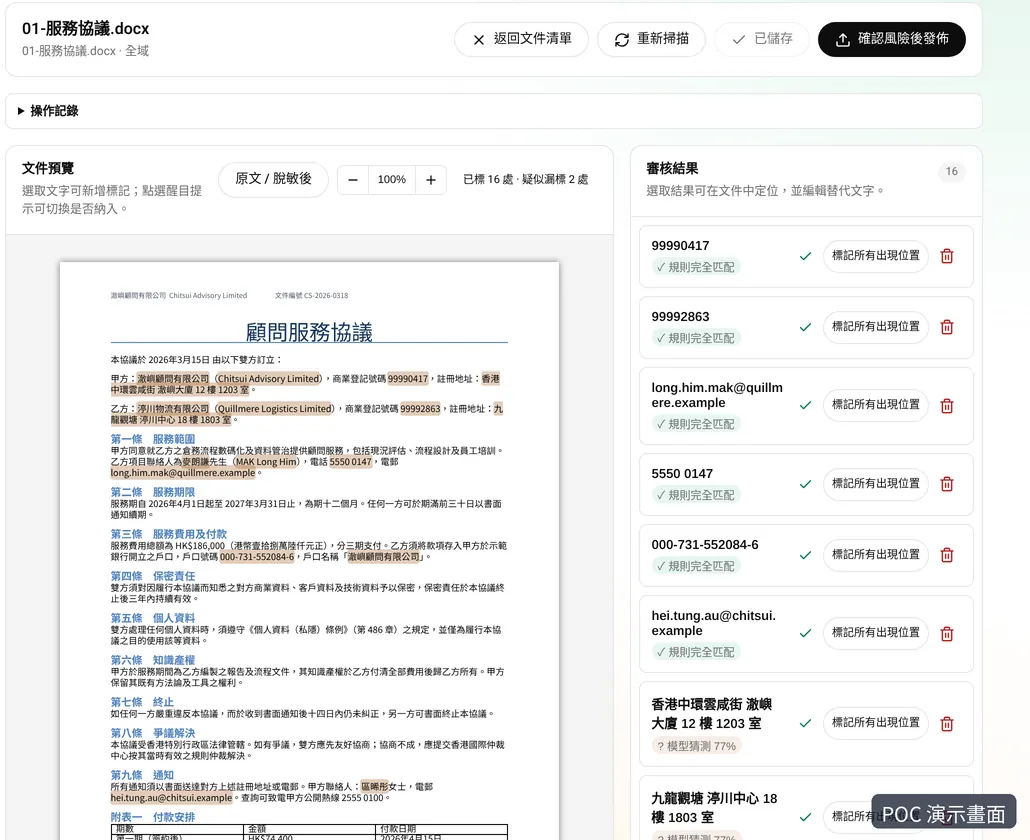
Review screen: document preview with sensitive details highlighted, and a list showing whether each was an exact rule match or a model guess
Flagging: every item shows its source
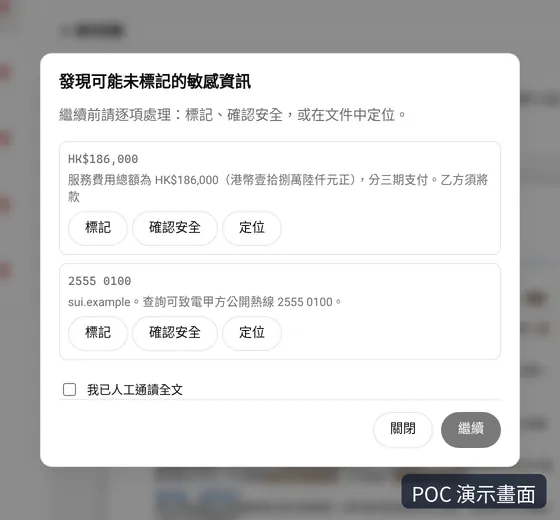
Pre-publish check: a dialog lists an amount and a phone number that may have been missed, each with Mark, Safe and Locate
Confirmation: one more check before publishing
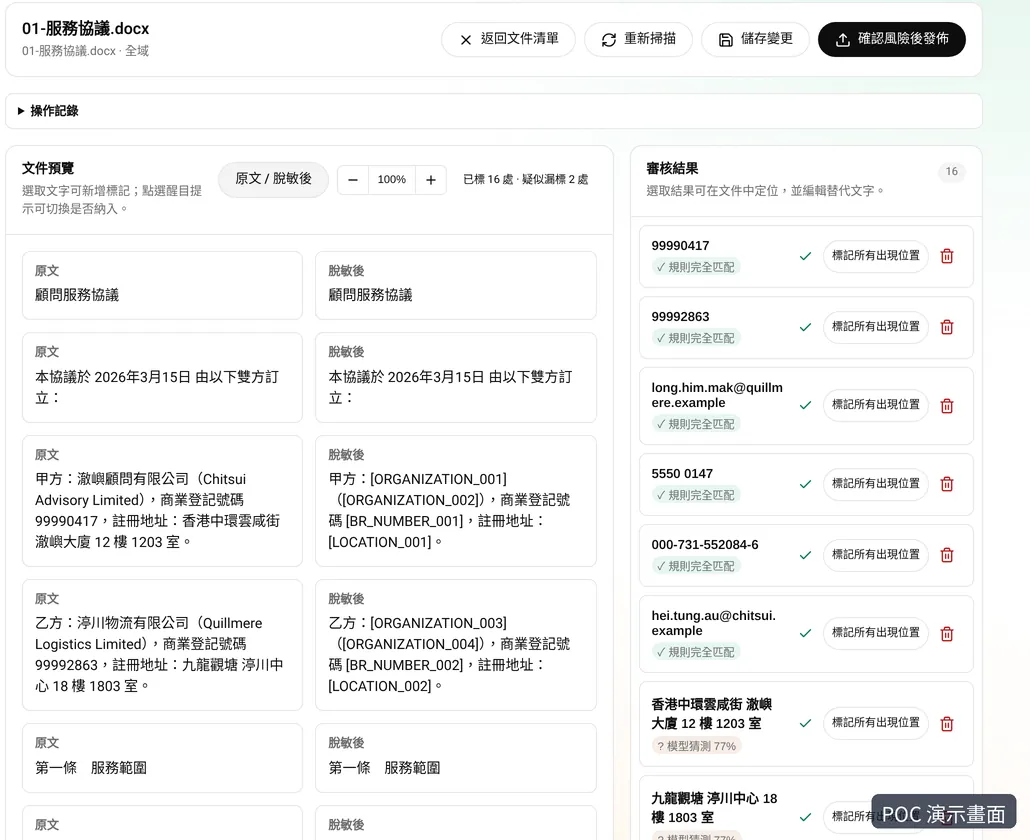
Side-by-side view: original text next to the masked version, with company names, registration numbers and addresses replaced by placeholders
Before and after, side by side

A shareholder resolution, before and after

All data below is fictional.

Original

Shareholder Chan Tai Man (HKID A123456(7)) transfers 10,000 shares to Lam Ting Investments Limited.

Redacted version

Shareholder [PERSON_1] (HKID [ID_1]) transfers [QTY_1] shares to [COMPANY_1].

Where the original goes, and what AI sees

Local environment
Original
Workbench in your environment (flag, review)
Redacted version
AI assistant
  • Originals are processed in the workbench, deployed on your servers or a Hong Kong cloud you choose.
  • AI assistants can read only published, redacted versions — never the original.
  • Nothing reaches AI until a person has approved it.

Your people make the final call

  • Every flag can be removed, edited or added.
  • Set rules globally or per group — contract numbers, signing dates, company names.
  • Publishing locks the version; you can withdraw it at any time.

Supported files

Supported
  • Common office documents (currently focused on Word and text-based PDF)
Planned
  • Scans and images
  • Excel
  • PowerPoint
  • handwritten signature masking
Note
Video is not supported.

Keep the AI assistant you already use

The workbench connects to MCP-capable AI assistants, set up in one click.

Ask in chat and the assistant fetches the published, redacted file to summarise, compare or draft.

Why not drop files straight into chat? One missed step and the original is already gone. Going through the workbench first is the safer habit.

Deployed where you decide

On-premises

installed on your own servers — suited to law firms and organisations with strict data-location rules.

Private cloud

deployed in a cloud account you control (e.g. a Hong Kong region); data stays in your account.

Detection can use rules plus a locally hosted model, sized to your budget — we'll scope it with you.

For a trial, we'll tell you in writing where it runs; we recommend testing with fictional files only.

Where teams start

Shareholder updates
an address or shareholding change touching five or six documents — redact, then let AI draft the edits.
Matter summaries and comparisons
AI organises background and compares drafts without seeing client identities.
Sharing externally
redact first, then send to colleagues or clients — no more manual line-by-line edits.

FAQ

Does the original leave my environment?
In a production deployment, the workbench and detection service run on your servers or chosen cloud, and originals are processed there. AI assistants read only redacted versions. We'll state where any trial environment runs up front.
How accurate is detection?
Automatic flags can miss or over-flag, which is why every file needs human sign-off before it's published.
What if staff skip the workbench?
It doesn't intercept all AI use; staff need to put files through the workbench. Pair it with your internal AI policy.
Can AI-edited files be restored with the original details?
This is still being validated; we can test it together in a trial.
Which AI assistants work with it?
Any AI assistant that supports MCP.
Can a team share it?
Team sharing and permissions are on the roadmap; ask us for the latest.
How do we start a trial?
Book a demo. We'll walk through the full flow on fictional shareholder documents, then agree a trial scope.

See it on a fictional version of your own document

A 30-minute walkthrough, from upload to review to AI.

Book a demo

Fill in the form and we will arrange a demo time.

or email us